2026’s Top 10 Technological Trends

Top 10 Technology Trends Dominating 2025

By 2025, technology will not only continue to develop but also transform how we communicate, work, study, and live. The rate of development is more rapid and thrilling than ever before, with AI transforming industries and immersive realities permeating daily life.

Here are the top 10 technological trends that will dominate 2025, whether you’re a tech enthusiast, business owner, or simply interested in what’s coming up next.

1. AI Pervasive: From Helpers to Producers

Artificial intelligence is no longer a new concept. Real-time translations, AI coding tools, hyper-personalized content, intelligent assistants, and even the creation of music and art are all made possible by AI in 2025.

  • Claude, Sora, Gemini, and ChatGPT are popular tools.
  • Impact: Customer service, healthcare diagnostics, content production, and business automation

AI is evolving to become your daily companion, not simply a tool.

AI Pervasive: From Helpers to Producers

2. Generative AI Becomes More Intelligent and Secure

Even if generative AI is producing realistic deepfakes and blog posts, 2025 will be all about responsible generation. At the forefront are openness, regulation, and watermarking.

  • New applications: ElevenLabs, Sora, Midjourney, and DALL·E
  • Use cases include UX/UI design, marketing, teaching, and filmmaking.

3. AR/VR/XR Mixed Reality Becomes Commonplace

Spatial computing is becoming more widely available to individuals and businesses with products like Apple Vision Pro, Meta Quest 3, and more reasonably priced AR gadgets.

  • Applications include remote assistance, immersive gaming, interactive learning, and virtual meetings.
  • The tendency to blur the distinctions between digital and physical

In the coming years, AR glasses are expected to become as popular as smartphones.

AR/VR/XR Mixed Reality Becomes Commonplace

4. 5G and 6G Networks: Everything Is Hyperconnected

While the development of 6G promises lightning-fast internet that permits real-time holographic communication and AI edge computing, 5G is already improving speed and latency.

  • Impact: Real-time robots, smooth streaming, and smarter cities
  • Affected industries include agriculture, healthcare, logistics, and entertainment.

5. AI-Powered Healthcare and Biotechnology

AI is transforming robotic surgery, medication development, and healthcare diagnostics. In 2025, more wearable technology and home testing kits with AI capabilities should be available.

  • Examples include AI diagnostic assistants and smartwatches that can identify illnesses early.
  • Trend: Faster, more precise therapies and personalized medication

AI-Powered Healthcare and Biotechnology

6. Cybersecurity AI-powered

The defenses change along with the threats. By 2025, artificial intelligence (AI) will be used by cybersecurity technologies to identify irregularities, stop phishing attempts, and instantly stop ransomware attacks.

  • Trend: AI vs. AI: combating offensive and defensive algorithms
  • Commonly used tools include Bitdefender AI, SentinelOne, and CrowdStrike.

Cyber hygiene is now necessary, not optional.

7. Sustainable Innovation & Green Technology

Technology is now about sustainability as much as performance. Significant advancements in clean technology, energy-efficient data centers, and environmentally friendly hardware are anticipated by 2025.

  • Examples include biodegradable packaging, smart grids, and solar-powered Internet of Things devices.
  • Leading companies include Beyond Meat, EcoFlow, Google, and Tesla.

A more conscientious digital future is being shaped by sustainable technology.

Sustainable Innovation & Green Technology

8. Beyond Crypto, Blockchain

Blockchain is quietly changing supply chains, identity verification, smart contracts, and even voting systems, while cryptocurrency makes headlines.

  • Trends include Web3 platforms, NFTs in gaming and art, and decentralized apps (dApps).
  • Use cases include real estate, healthcare record archiving, and transparent governance.

It has to do with decentralization, security, and trust.

9. Conversational Interfaces and Voice Technology

Voice assistants are becoming more emotion-sensitive, multilingual, and context-aware; smart speakers are outdated. Voice is winning in accessibility and hands-free work.

  • Well-known platforms include OpenAI Voice Mode, Google Assistant, Siri, and Alexa.
  • Voice-activated automobiles, houses, and offices are a trend.

We’re heading toward a world without screens and hands.

Conversational Interfaces and Voice Technology

10. The Explosion of No-Code/Low-Code Platforms

These days, tech isn’t just for programmers. Anyone can create an app, website, or automation workflow with little to no coding knowledge thanks to platforms like Notion AI, Webflow, and Bubble.

  • Benefits include reduced developer workload, easier access to innovation, and quicker prototyping.
  • Trend: Encouraging small enterprises, entrepreneurs, and innovators

This is how development is becoming more democratic.

Concluding remarks

2025 will be a year of digital empowerment, immersive experiences, and intelligent automation. We now have access to the tools we once only dreamed of, and they are changing the way we interact, work, and live.

The secret to remaining ahead is to keep up with these developments, whether you’re utilizing AI tools, investigating augmented reality experiences, or using cybersecurity to future-proof your company.

2026’s Best Mind Mapping Resources for Innovative Thinkers

2025's Best Mind Mapping Resources for Innovative Thinkers

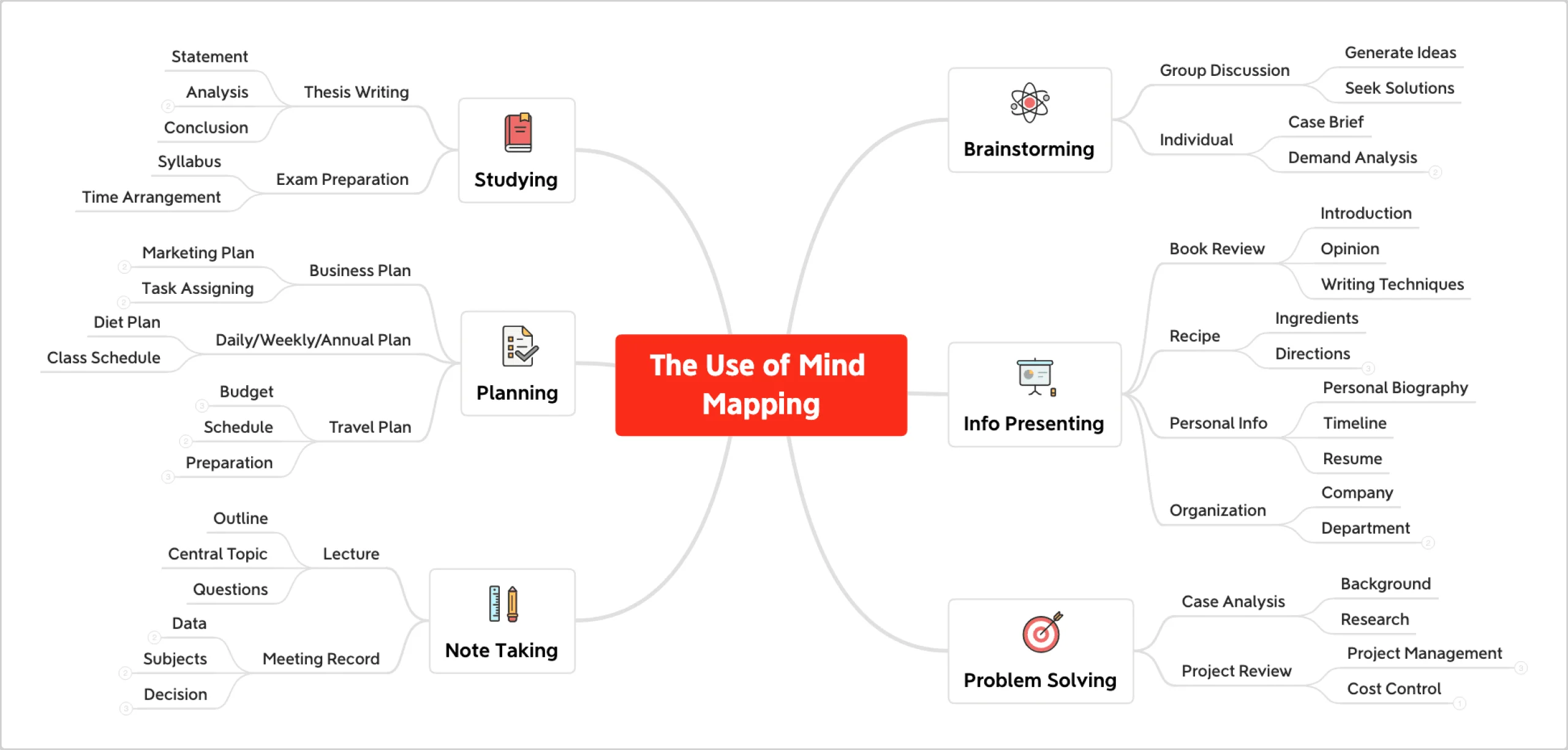
Disorganized notes and to-do lists frequently fall short when your mind is overflowing with thoughts. This is where mind mapping tools come in, providing a dynamic, visual method for brainstorming, organizing ideas, and coming up with creative solutions to issues.

The correct mind mapping software may help you stay focused on the details while fostering creativity, increasing productivity, and helping you see the big picture, regardless of your role—student, entrepreneur, content creator, or strategist.

The best mind mapping tools for creative thinkers in 2025 will be discussed in this article. These tools are strong, easy to use, and made to encourage the use of your imagination.

A Mind Mapping Tool: Why Use It?

Let’s quickly review the advantages before getting into the tools:

  • Visually arrange complicated concepts
  • Enhance learning and memory
  • Encourage innovation and problem-solving
  • Improve cooperation
  • Convert concepts into workable plans.

Are you prepared to let your inner genius loose? Now let’s explore the best tools.

A Mind Mapping Tool: Why Use It?

1. MindMeister: The Greatest Tool for Group Mind Mapping

MindMeister is a feature-rich platform that facilitates real-time collaborative brainstorming, which makes it perfect for classrooms, creative companies, and remote workers.

Important attributes:

  • Real-time commentary and cooperation
  • Presentation mode for exchanging concepts
  • Task management integration with MeisterTask
  • Adaptable icons and themes

2. XMind: Stylish, Strong, and Free for Individuals

One of the most widely used mind mapping programs in the world, XMind is renowned for its sophisticated layout and astute diagramming capabilities.

Important attributes:

  • Logic, tree, and fishbone charts
  • Zen Mode for uninterrupted concentration
  • Dark Mode and fashionable themes
  • Cross-platform (iOS, Android, Windows, and macOS)

3. Miro: Perfect for Visual Thinkers & Teams

Miro is a visual collaboration tool that is more than just a mind map. It is used by teams for whiteboarding, wireframing, and brainstorming.

Important attributes:

  • Templates and an infinite canvas
  • Diagrams, flowcharts, and sticky notes
  • Collaboration and voting in real time
  • Connects to programs like Google Workspace, Zoom, and Slack

4. Whimsical: Easy, Quick, and Clear

Whimsical is a dream tool if you’re searching for something simple. It works well for wireframes, mind maps, and rapid sketches.

Important attributes:

  • Simple drag-and-drop functionality
  • Combines sticky notes, flowcharts, and mind maps.
  • Excellent for content ideation and UX/UI planning

5. The Greatest for Apple Users: MindNode (Mac/iOS)

The exquisitely designed MindNode app was created especially for the Apple ecosystem. It’s ideal for brainstorming, goal-setting, and personal journaling.

Important attributes:

  • Visual Tags and Focus Mode
  • Sync between iPhone, iPad, and Mac
  • Outlining support and rapid entry
  • Export to an image, markdown, or PDF

The Greatest for Apple Users: MindNode (Mac/iOS)

6. Lucidchart: Excellent for Data-Driven Mapping and Business

Lucidchart is ideal for professionals, engineers, and strategic planners since it blends mind mapping with sophisticated diagramming.

Important attributes:

  • Organization charts, systems, and flowcharts
  • Work together and leave comments instantly.
  • Connects to G Suite, Atlassian, and Microsoft

7. Coggle: Simple to Use, Shareable Interface

Coggle’s user-friendly UI and real-time sharing make it ideal for rapid brainstorming.

Important attributes:

  • Multi-user cooperation in real time
  • Save automatically to Google Drive
  • Support for Markdown for taking notes
  • Unlimited diagrams in a free plan

Concluding remarks

Mind mapping is an effective technique for anyone wishing to connect, generate, and clarify ideas; it’s not just for visual learners. With the correct instrument, confusion may be transformed into clarity, and you can think more effectively, quickly, and creatively.

There is a tool here for everyone, whether you are a writer planning your content calendar, a student planning a thesis, or the founder of a startup sketching out your next big product.

A Clear Guide to Using Notion in Project Management for 2026

A Clear Guide to Using Notion in Project Management for 2025

One tool—Notion—has emerged as the mainstay in the constantly changing realm of digital productivity. What began as a straightforward note-taking app has evolved into a robust multipurpose workspace that is ideal for handling everything from little assignments to extensive group projects.

Notion makes project management flexible, structured, and even enjoyable, regardless of whether you’re a student, freelancer, or employee of a developing company.

Even if you’re a total novice, we’ll show you how to utilize Notion for project management in this blog.

Why Manage Projects Using Notion?

What makes Notion unique is:

  • Extremely adaptable (no one-size-fits-all)
  • Excellent for both individuals and groups
  • Integrates calendars, databases, tasks, and notes into one tool.
  • Personal use is free, while team use is reasonably priced.

Additionally, it syncs instantaneously and functions on all devices.

Why Manage Projects Using Notion?

Beginning to Use Notion

Step 1: Establish a New Page or Workspace

Click “Add a Page” on the sidebar after logging in. It should be called something like “Project Management” or “My Team Dashboard.”

A template or a blank page is your option; Notion provides pre-made templates for:

  • Boards for Kanban
  • Lists of tasks
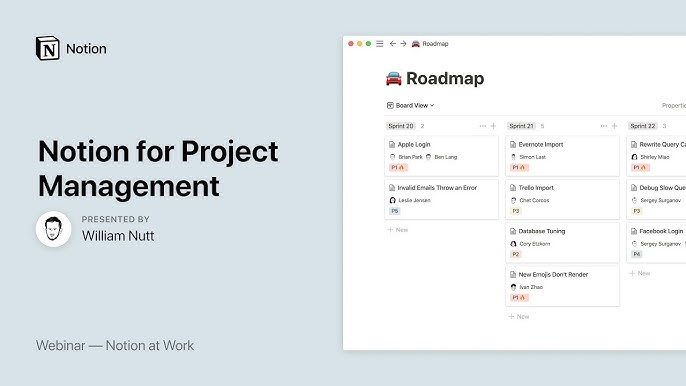
  • Roadmaps
  • Notes from the meeting
  • Project monitoring tools

Step 2: Set Up Your Project Database

To create your project tracker in Notion, follow these steps:

Select “Table” or “Board” View.

  • Table = spreadsheet format
  • Board = Trello-like Kanban-style

Include the necessary columns (properties).

  • Name of the Project
  • Date of Due
  • Assigned To
  • Status (Completed, In Progress, To Do)
  • Attachments or Notes
  • Associated Activities (with relational databases)

Include Your Projects

  • For every project or job, add rows or cards.
  • Give them a status tag and set due dates.

Pro Tip: To improve visual clarity, use color-coded tags.

Step 3: Establish a Calendar View or Timeline

Use the following database view to improve time management:

  • View all tasks by due date in the calendar view.
  • Timeline View: Perfect for planning long-term projects (similar to Gantt charts)

This aids in identifying bottlenecks and visualizing your progress.

Step 4: Provide Links to Related Tasks or Pages

Notion enables you to link many databases or pages. For instance:

  • Assign a project task to the meeting notes.
  • Attach smaller tasks to a larger project.

This ensures that no information is lost by creating a web of interconnected data.

Step 5: Work Together With Your Group

Collaborating with others? Team members are invited to visit your page. You could:

  • Utilize the “Person” property to assign assignments.
  • Remark on the tasks
  • Exchange files or updates.
  • When tagging colleagues, use @mentions.

Everyone is literally on the same page thanks to real-time updates!

Work Together With Your Group

Step 6: Optimize & Automate

Elevate your project management skills:

  • To save time when creating repeating tasks, use templates.
  • Include checklists in your task cards.
  • Make dashboards with integrated calendar, note, and task displays.

Even better, you can use tools like Zapier or Notion API to link Notion with Slack, GitHub, Google Calendar, and more.

Bonus Advice: Keep Things Simple and Clean

You can customize Notion indefinitely, but don’t go overboard.

  • Begin with a simple design.
  • Sort by deadline or priority.
  • For readability, use headings and emojis.
  • To cut down on clutter, archive finished tasks.

Concluding remarks

Notion is a personalized command center for all of your projects, not simply another project management application.

Notion keeps you accountable, organized, and stress-free whether you’re running a company-wide project, a side gig, or a group effort.