Free AI Tools: Some Best Free AI Tools to Save Time and Work Smarter in 2026

BEST AI TOOL 2026

Artificial intelligence is now available for everyo  ne. Free AI tools can help you in writing, design, video editing, and much more. With generous free plans, you can get more done every day.

Why Are People Interested in Free AI Tools

Why Are People Interested in Free AI Tools?

AI tools became more in demand because they allow you to automate your daily tasks and save hours of hard work. They also ensure that you always deliver high-quality content and documents, no matter what task you need to accomplish. Free AI tools are perfect for novices since most of them are intuitive and do not require years of experience.

Top 8 Free AI Tools

Top 8 Free AI Tools That Are Perfect for Everyday Tasks in 2026:

1. ChatGPT:

This AI tool is in high demand among content writers, students, and business owners who want to use it for blog posts creation, emails, coding instructions, creating social media content, etc. The software also offers several modes to choose from including chatbot, researcher, writer, and coder. Additionally, one can ask ChatGPT for an explanation and receive links to relevant articles on the topic.

2. Google Gemini:

Gemini is another powerful AI that allows one to create articles, come up with ideas, and research different subjects. It can be used in many areas including marketing, managing emails, and engaging in other activities.

Canva AI


3. Canva AI:

Canva enables you to create beautiful images and posts for social media, slide presentations of your work, and much more. You don’t need to be an expert designer since all you have to do is simply put a prompt, and the magic happens!

4. Grammarly:

Grammarly is a very helpful tool because it helps to correct vocabulary and mistakes; its use is too easy. It helps correct the structure of sentences.

Perplexity AI

5. Perplexity AI:

Perplexity is a novel artificial intelligence system that unites the properties of a search engine and a chatbot. This technology is advantageous because it provides answers to questions with appropriate references, thus making research easier.

6. Claude AI:

Claude AI is another great tool for writing long articles, brainstorming ideas, and managing documents. It has a natural writing style and is great for professional communication.

7. Microsoft Designer:

Microsoft Designer is an artificial intelligence graphic design tool you can use to create logos and images with text prompts. It is a convenient and innovative way to design graphics in no time.

8. CapCut AI:

CapCut AI is a free video editing tool for making videos shorter, adding subtitles, and incorporating AI filters. It is suitable for all types of content creators and has a lot of interesting functions that will make your job easier.

Benefits of Using Free AI Tools

Benefits of Using Free AI Tools:

Many people wonder why they should use free AI tools since they can use the paid versions and get more features and benefits. However, the main advantage of free AI tools is that they are accessible to everyone. Irrespective of people’s financial status, everyone can have equal opportunities to use AI.

Another advantage is that free AI tools make work automatic, so you have more time for important tasks.Furthermore, free AI tools make content creation and video editing precise, thus eliminating the need to double-check everything. In addition, these tools take away the guesswork in writing and graphic design since they provide suggestions for related words, images, and graphic design concepts to follow.

How to Choose the Best Free AI Tool?

Many free AI tools have similar aims but offer various functions and features. Some are more specialized and better at a particular task, while others are more versatile and can be applied to several fields. For example, to generate articles, one should look for an AI tool that can help with content creation and offer multiple writing options. In contrast, to design images, one should choose an AI tool that can fulfill graphic duties.

Design AI tool:

When selecting the platform, you should also pay attention to how intuitive it is, what free plans it offers, whether you can export the content, and which other programs it can be integrated with. To understand which AI tool is right for you, it may take some time to explore various options offered by the market.

Frequently Asked Questions:

Are these tools really free?

Yes, most AI tools offer a free plan with certain limitations. However, if you want to get more out of them, you will have to go with a paid subscription.

What tool is best for writing articles?

ChatGPT, Claude AI, and Grammarly are best for content writing, making emails, and editing documents.

Can companies or small business owners benefit from free AI tools?

Yes, since organizations tend to work on a budget, these tools can offer the same result as paid versions without spending any money on subscriptions.

Final Thoughts:

Artificial intelligence instruments are gaining more popularity as they enable one to achieve more in a shorter period of time. Thus, the tools can be applied in a wide range of activities including article writing, graphics designing, and video editing among others. In addition, the tools have been proven reliable as one can trust their results such as images, videos or articles they produce. Therefore, when looking for the best tools to apply, it is important to consider their features, benefits, and functions.

Base44: All-in-One AI Platform for Powerful Business Apps

Base44

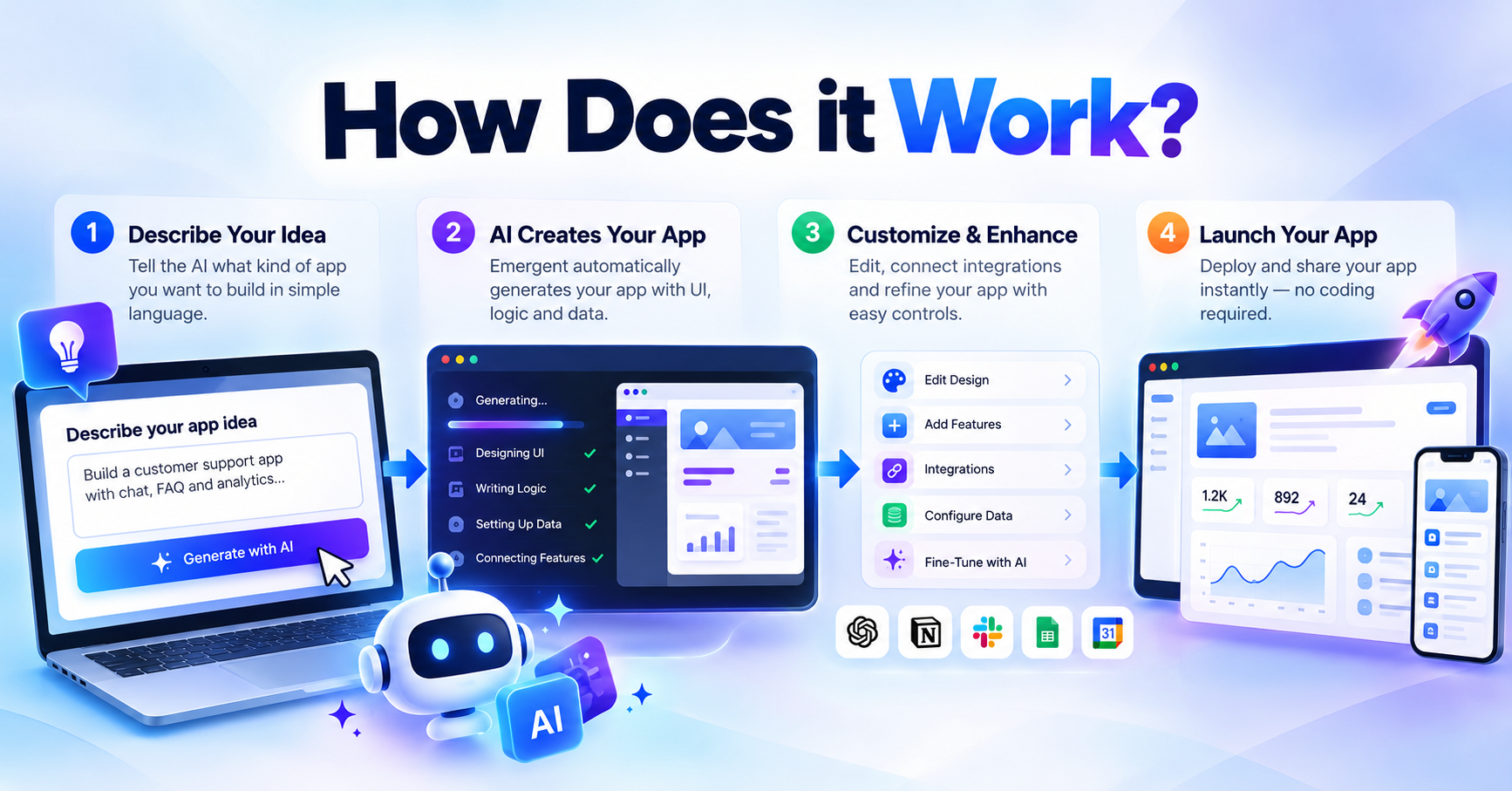
Out here in the thick of things, companies keep hunting for ways to make apps quicker while spending less and getting more done. What if a tool could strip away the usual headaches of coding? Enter Base44it runs on smart tech that guides people from raw idea straight to working software, skipping oldschool hurdles most teams get stuck on. Instead of wrestling lines of code, users shape what they need through smoother steps. Speed shows up where it matters. The whole thing moves like something built for now, not ten years ago.

what is base44

What Is Base44?

Out here, building apps just got simpler thanks to Base44. This tool lets founders, small teams, artists, and companies shape software through plain descriptions. While old methods demand endless coding sessions and tangled processes, this system skips ahead by crafting working parts from ideas. Imagine typing your vision instead of debugging lines for weeks. The platform listens, then responds with functional blocks ready to use. No need to master complex frameworks or hire big teams first. Faster than ever, ideas become actual tools using this. It speeds up what once took much longer.

Folks who never wrote a line of code can still create apps here. Whether it is just someone tracking client meetings or whole groups handling everyday tasks, things run. Need a place where customers book appointments. Think of selling goods online through a custom hub. Or streamlining tasks across departments. Base44 gives what fits each case. Starting takes little time, effort stays low.

Base44 How It Works?

What makes Base44 stand out? Its core runs on artificial intelligence. Tell it what you need, then watch as it builds your app’s layout, data setup, processes, and screens. Because of this, getting a digital product live takes far less time. Much less manual work gets in the way.

Startups using Base44 find more room to experimentroutine coding chores get handled silently behind the scenes. Innovation grows when teams stop wrestling with setup details. Customer needs take center stage once deployment headaches fade away. Growth follows naturally, step by step, as energy shifts from maintenance to meaningful features.

Base44 Key Features

Base44 Key Features:

AI-Powered Application Development:

Out of nowhere, Base44 uses smart AI to speed up how apps are built. Most folks just write down their needs like a note to a friend. That simple step means apps come together faster than the old methods ever did. Efficiency jumps when ideas turn straight into working tools.

No Code Low Code Features:

Some people do not know how to code. With Base44, those folks can still create powerful apps because it works without much code. Instead of writing lines of software instructions, they use simpler tools built right in. This way, getting things done does not depend on being a programmer. Complexity fades when access opens up for more kinds of builders.

Database Management:

When it comes to apps, handling data right makes all the difference. With Base44, companies get tools built in to sort, keep, and work with their infowithout extra steps getting in the way.

Workflow Automation:

Out of today’s office routines, one thing stands clearless typing means more time. With Base44, repetitive steps fold into smart sequences without needing a single code line. Some tasks just vanish once they’re set free by automation. What used to take hours now slips quietly into the background. Work keeps moving, even when people step away.

Scalable Infrastructure:

When companies get bigger, so must their software. Built for expansion, Base44 keeps pacemanaging more people, information, and workload without skipping a beat.

Base44 Advantages

Base44 Advantages:

Most companies go with Base44 simply because it cuts down on hours spent and people needed. Hiring coders, visual artists, or system experts? That’s usually what oldschool app building demands. With Base44, much of that gets trimmedfewer steps mean lower expenses and faster rollouts.

Speedy testing of fresh concepts marks one clear benefit. Firms roll out offerings fast, collect user reactions, then refine themno drawnout build phases needed. Quick shifts like these matter a lot now, when staying ahead means moving swiftly.

Flexibility stands out just as much. Whether teams need tools for daily tasks or apps meant for customers, Base44 handles them. Startups find it works, so do large companies, along with smaller operations in between.

Businesses Rely on Base44:

Most companies look for tech that works well, stays safe, doesn’t break down. Instead of piling on features, Base44 uses smart systems paired with clear interfacesmaking it possible to build strong apps fast. Complexity fades when design follows function.

Teams work better together when they can skip the busywork. Skipping the hard tech stuff means getting ideas out fast. Moving quick keeps a company one step ahead. Doing more with less lets everyone aim at what matters most.

Conclusion:

Something different happens when tech feels simple. Base44 mixes smart automation with clear design so teams can create without slow steps. Not just startups but bigger groups too find what they need inside one space. Speed grows where ideas meet structure. A quiet shift takes placeless effort, more output. Tools adapt instead of getting in the way. Growth doesn’t shout, it just moves faster here.

What Is Aircall? Features, Benefits, and How It Helps Modern Businesses

aircall

Communication shapes how businesses connect now. Phone setups from the past? They lag behind when teams work from different places. Customers expect more than old systems can give. Enter Aircall – built for today’s pace, not yesterday’s limits.

Cloud-hosted, Aircall works as a business telephone setup that helps organizations handle client talks better. Not just calls but smart tools too – routing, logging, tracking – come built in. Teams focused on selling or assisting can reach out from any location, thanks to internet-powered dialing. Data flows straight into dashboards, showing patterns without extra steps. Syncs happen smoothly with customer platforms already in use. No hardware piles up; everything runs online. Workers adapt fast because the layout stays clear. Calls link directly to records so context never gets lost. Performance clues appear through reports updated live. Remote offices stay aligned using shared call rules. Setup skips complicated wiring, favoring plug-and-go logic. Each team member accesses their own number while sharing one system. Security layers protect every connection by default. Upgrades roll out automatically behind the scenes. Support arrives quickly when issues pop up. Numbers work across devices without hiccups. Call quality holds steady even on unstable networks. Admin controls let managers tweak settings quietly. History logs remain searchable long after chats end. Flexibility grows naturally with company size.

what is aircall

What Is Aircall?

Internet-based calling comes alive through Aircall, a system swapping old-style phones for digital connections. Built with frontline workers in mind – those who talk to customers daily – it serves sales staff, helpers on support desks, even busy contact center voices. Instead of copper wires, conversations travel across online pathways smoothly. Teams adapt quickly because setup leans into simplicity without heavy hardware. What once needed physical infrastructure now runs within browsers and apps. People answer or dial out using devices they already own. Flexibility grows when location stops mattering as much. Each user gets tools tailored to real-time interactions. Voice clarity stays sharp thanks to stable web protocols underneath. Customer talks gain structure with integrated tracking features.

Starting from anywhere, Aircall runs on the internet so companies get phone lines fast. Teams show up online before gear arrives. Handling customers happens through screens instead of wires. No big machines needed, just access. Setup skips old systems entirely.

Essential aspects of aircall

Cloud-Based Phone System

Out in the digital open, Aircall runs without needing hardware on-site. Wherever people log in – be it home, café, or headquarters – the system keeps them linked up through any standard device. Connection sticks, even when locations shift day to day.

Smart Call Routing

Some teams rely on Aircall to send incoming calls straight to the correct team member through smart routing choices. Instead of guessing, callers navigate voice menus that guide them where they need to go. Routing based on agent skills means help arrives quicker than before. Custom paths shape how each call moves, improving response times without extra effort.

Call Monitoring and Coaching

From the first ring, managers hear what happens live during calls. They step in when needed, guiding staff while talk unfolds naturally. Instead of waiting, feedback flows right after interactions end. Sales skills grow stronger over weeks, thanks to ongoing observation. Support replies become clearer, more helpful, simply through regular review.

Power Dialer

Out of nowhere, reps save minutes on calls thanks to Aircall’s Power Dialer quietly handling outgoing sequences. Instead of punching each digit by hand, the system moves through contacts like a steady rhythm. One after another, attempts launch without pause. What used to eat up seconds now flows – smooth, constant, almost unnoticed. Time stacks up differently when clicks vanish into automation.

Call Analytics and Reporting

Aircall tracks how many calls come in, how fast teams answer, which ones slip through, plus how reps are doing on each task. When leaders see these numbers clearly, choices about support get sharper by the day.

crm helpdesk tools connect

What makes Aircall stand out? It connects smoothly with widely used apps like Salesforce, HubSpot, Zendesk. Information about customers flows between systems without needing someone to retype it. Because of this linkup, teams spend less time on repetitive tasks. Work moves faster when data travels on its own.

Aircall Advantages

Aircall Advantages

Improved Customer Experience

Faster answers, tailored just right – people want that when they reach out. With smart pathfinding for every call, Aircall keeps teams moving without delays. Pulling up details takes seconds, not minutes, so conversations stay on track. Smooth handoffs between team members happen naturally, cutting down wait times. Each step connects cleanly, making follow-ups simpler than before.

Increased Productivity

With automation handling routine work, agents spend time where it matters most – talking to customers. Because of this shift, teams manage higher call volumes without dropping standards.

Scaling With Business Growth

When companies grow, talking across teams gets trickier. With Aircall, bringing in new people, sections, or lines happens smoothly – no extra gear required.

Better Team Collaboration

Teamwork gets easier when everyone sees the same caller messages. One person tags a call, another adds notes – details stay clear. Assignments shift smoothly between members. Quick fixes happen because nothing slips through cracks. Shared access keeps pace with fast-moving conversations.

Remote and global team support

Working online means Aircall lets staff handle company calls from any location. Since it runs through the web, staying connected doesn’t depend on being in an office. Remote setups fit naturally with how the system operates. Teams spread across time zones find it works without hiccups. Global companies rely on it because distance doesn’t break functionality.

Who Should Use Aircall

Who Should Use Aircall?

Aircall is a valuable solution for:

  • Customer support teams
  • Sales departments
  • SaaS companies
  • Call centers
  • E-commerce businesses
  • Marketing agencies
  • Professional service firms
  • Remote and hybrid organizations

Aircall’s cloud system works well for businesses using phones a lot. When talk happens mostly by call, this setup helps keep things running. Offices focused on voice chats find it smooth to handle daily tasks. Firms where customer contact is key often see improvements. Using internet-powered calling changes how teams manage conversations.

Businesses Pick Aircall

Aircall gets picked by companies not for flash but for how it just fits. Starting fast matters, so setup skips long waits. Tools already in use? They link right up, no forcing. Fancy functions arrive ready, yet nobody needs a manual to make them work. Smooth, quiet, effective – that sums it.

With Aircall, companies adjust fast when demands shift – no matter how sudden. Old-style phones can’t keep up. Yet every customer still gets clear, reliable service. Flexibility shows up without sacrificing quality.

Final Thoughts

Cloud-based calling gets easier with Aircall, now widely used by today’s teams. Built-in tools handle calls smoothly while tracking every detail along the way. Automation runs quietly behind scenes, reducing manual steps without slowing things down. Data flows into CRMs automatically, keeping records updated across platforms. Teams focused on better conversations often find their rhythm here. Performance insights appear clearly, helping tweak strategies fast when needed. Customer interactions feel more connected, less scattered than before. Setup stays simple even as demands grow over time. Reliability holds up during high-volume moments, not just quiet hours. Businesses aiming to streamline outreach tend to stick around once they start.

From overseeing sales crews to guiding help desks or shaping teams that work apart, Aircall equips each role with what it takes to smooth out conversations while lifting service quality. Though setups differ, the backbone stays steady – clear contact paths built right into daily flow.